DHCP Relay and DHCP Server lab
This lab shows an example of an IPv4 DHCP relay and DHCP server with BSDRP (v1.51).
Overview
Network diagram
Here is the logical and physical view:
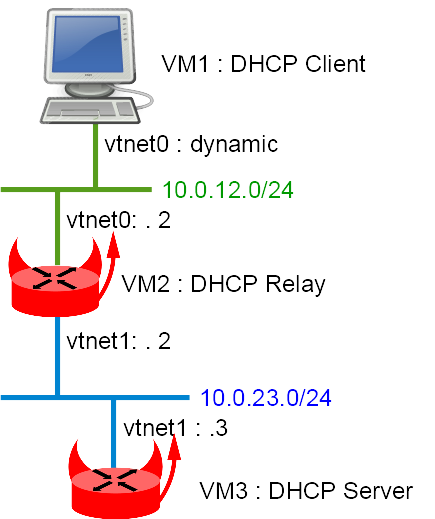
Setting up the lab
Downloading BSD Router Project images
Download a BSDRP serial image (to avoid needing an X display) from SourceForge.
Downloading BSDRP lab scripts and starting the lab
More information on the BSDRP lab scripts is available in How to build a BSDRP router lab.
Start a lab with 3 full-meshed routers (no common LAN). Example with the VirtualBox script:
# tools/BSDRP-lab-bhyve.sh -i BSDRP-1.903-full-amd64-serial.img.xz -n 3
BSD Router Project (http://bsdrp.net) - bhyve full-meshed lab script
Setting-up a virtual lab with 3 VM(s):
- Working directory: /tmp/BSDRP
- Each VM have 1 core(s) and 256M RAM
- Emulated NIC: virtio-net
- Switch mode: bridge + tap
- 0 LAN(s) between all VM
- Full mesh Ethernet links between each VM
VM 1 have the following NIC:
- vtnet0 connected to VM 2
- vtnet1 connected to VM 3
VM 2 have the following NIC:
- vtnet0 connected to VM 1
- vtnet1 connected to VM 3
VM 3 have the following NIC:
- vtnet0 connected to VM 1
- vtnet1 connected to VM 2
For connecting to VM'serial console, you can use:
- VM 1 : cu -l /dev/nmdm1B
- VM 2 : cu -l /dev/nmdm2B
- VM 3 : cu -l /dev/nmdm3B
Router configuration
VM3 (DHCP server)
sysrc hostname=VM3
sysrc gateway_enable=NO
sysrc ipv6_gateway_enable=NO
sysrc ifconfig_em1="10.0.23.3/24"
sysrc defaultrouter="10.0.23.2"
sysrc dhcpd_enable=YES
sysrc dhcpd_flags="-q"
sysrc dhcpd_conf="/usr/local/etc/dhcpd.conf"
sysrc dhcpd_ifaces="em1"
sed -i "" 's/em/vtnet/g' /etc/rc.conf
cat > /usr/local/etc/dhcpd.conf <<'EOF'
subnet 10.0.23.0 netmask 255.255.255.0 {
}
subnet 10.0.12.0 netmask 255.255.255.0 {
  range 10.0.12.100 10.0.12.200;
  option routers 10.0.12.2;
}
'EOF'

hostname VM3
service netif restart
service routing restart
service isc-dhcpd start
config save
VM2 (router and DHCP relay)
sysrc hostname=VM2
sysrc ifconfig_em0="10.0.12.2/24"
sysrc ifconfig_em1="10.0.23.2/24"
sysrc dhcprelya_enable=YES
sysrc dhcprelya_servers="10.0.23.3"
sysrc dhcprelya_ifaces="em0"
sed -i "" 's/em/vtnet/g' /etc/rc.conf
hostname VM2
service netif restart
service routing restart
service dhcprelya start
config save
VM1 (DHCP client)
sysrc hostname=VM1
sysrc ifconfig_em0="DHCP"
sysrc gateway_enable=NO
sysrc ipv6_gateway_enable=NO
sed -i "" 's/em/vtnet/g' /etc/rc.conf
hostname VM1
service netif restart
service routing restart
config save
Final testing
Check the data received by the DHCP client on VM1:
[root@VM1]~# ifconfig vtnet0
vtnet0: flags=8943<UP,BROADCAST,RUNNING,PROMISC,SIMPLEX,MULTICAST> metric 0 mtu 1500
        options=80028<VLAN_MTU,JUMBO_MTU,LINKSTATE>
        ether 58:9c:fc:01:02:01
        hwaddr 58:9c:fc:01:02:01
        inet6 fe80::5a9c:fcff:fe01:201%vtnet0 prefixlen 64 scopeid 0x1
        inet 10.0.12.100 netmask 0xffffff00 broadcast 10.0.12.255
        nd6 options=21<PERFORMNUD,AUTO_LINKLOCAL>
        media: Ethernet 10Gbase-T <full-duplex>
        status: active
[root@VM1]~# cat /var/db/dhclient.leases.vtnet0
lease {
  interface "vtnet0";
  fixed-address 10.0.12.100;
  option subnet-mask 255.255.255.0;
  option routers 10.0.12.2;
  option dhcp-lease-time 43200;
  option dhcp-message-type 5;
  option dhcp-server-identifier 10.0.23.3;
  renew 1 2017/7/10 20:14:07;
  rebind 2 2017/7/11 00:44:07;
  expire 2 2017/7/11 02:14:07;
}