Maximum BSDRP features lab
This lab is used to test BSDRP before each new release.
Overview
Network diagram
Here is the logical and physical view:
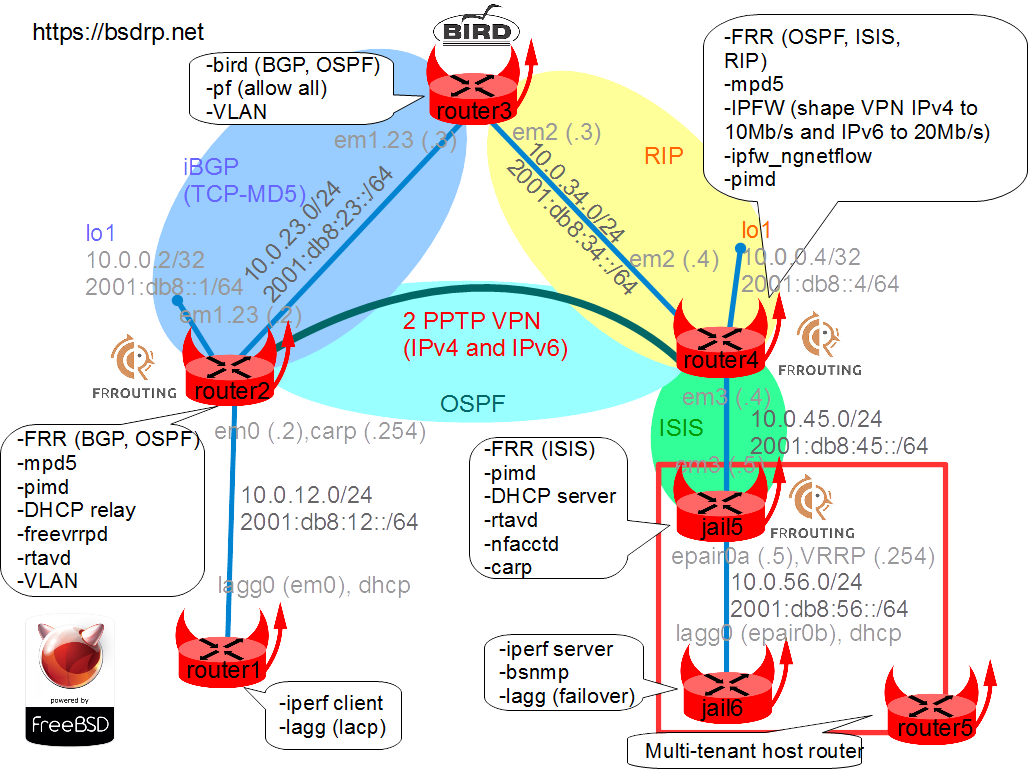
Setting up the lab
Downloading BSD Router Project images
Download the BSDRP serial image (which avoids the need for an X display).
Download lab scripts
More information on the BSDRP lab scripts is available in How to build a BSDRP router lab.
Start the lab with full-meshed 6 routers.
An example with bhyve under FreeBSD:
tools/BSDRP-lab-bhyve.sh -i /usr/obj/BSDRP.amd64/BSDRP-1.80-full-amd64-serial.img.xz -n 5
Setting-up a virtual lab with 5 VM(s):
- Working directory: /tmp/BSDRP
- Each VM have 1 core(s) and 256M RAM
- Emulated NIC: e1000
- Switch mode: bridge + tap
- 0 LAN(s) between all VM
- Full mesh Ethernet links between each VM
VM 1 have the following NIC:
- em0 connected to VM 2
- em1 connected to VM 3
- em2 connected to VM 4
- em3 connected to VM 5
VM 2 have the following NIC:
- em0 connected to VM 1
- em1 connected to VM 3
- em2 connected to VM 4
- em3 connected to VM 5
VM 3 have the following NIC:
- em0 connected to VM 1
- em1 connected to VM 2
- em2 connected to VM 4
- em3 connected to VM 5
VM 4 have the following NIC:
- em0 connected to VM 1
- em1 connected to VM 2
- em2 connected to VM 3
- em3 connected to VM 5
VM 5 have the following NIC:
- em0 connected to VM 1
- em1 connected to VM 2
- em2 connected to VM 3
- em3 connected to VM 4
To connect VM'serial console, you can use:
- VM 1 : cu -l /dev/nmdm-BSDRP.1B
- VM 2 : cu -l /dev/nmdm-BSDRP.2B
- VM 3 : cu -l /dev/nmdm-BSDRP.3B
- VM 4 : cu -l /dev/nmdm-BSDRP.4B
- VM 5 : cu -l /dev/nmdm-BSDRP.5B
Router configuration
Configure the routers in this order to avoid DHCP client timeout problems.
All these routers can be configured with the labconfig tool (use it only in a lab, because it will replace your current running configuration):
labconfig full_vm[VM-NUMBER]
Router 5 (including jail5 and jail6)
You can use the script labconfig vm5 to push the full configuration automatically:
sysrc hostname=R5 \
 ifconfig_em3=up \
 cloned_interfaces=epair0 \
 ifconfig_epair0a=up \
 kld_list+=" if_lagg carp"
ifconfig -l | grep -q vtnet && sed -i "" 's/em/vtnet/g' /etc/rc.conf
cat > /etc/devfs.rules <<EOF
[devfsrules_jailpf=4]
add include \$devfsrules_hide_all
add include \$devfsrules_unhide_basic
add include \$devfsrules_unhide_login
add path 'bpf*' unhide
EOF

hostname R5
service devfs restart
service netif restart
service kld start
if ifconfig -l | grep -q vtnet; then
    tenant -c -j jail5 -i vtnet3,epair0a
else
    tenant -c -j jail5 -i em3,epair0a
fi
tenant -c -j jail6 -i epair0b
sysrc -f /etc/jails/jail5/rc.conf hostname=jail5 \
 ifconfig_em3="inet 10.0.45.5/24" \
 ifconfig_em3_ipv6="inet6 2001:db8:45::5 prefixlen 64" \
 ifconfig_epair0a="10.0.56.5/24" \
 ifconfig_epair0a_ipv6="inet6 2001:db8:56::5 prefixlen 64" \
 ifconfig_epair0a_alias0="inet 10.0.56.254/32 vhid 1 pass testpass" \
 ifconfig_epair0a_alias1="inet6 2001:db8:56::fe prefixlen 128 vhid 1 pass testpass" \
 rtadvd_enable=YES \
 rtadvd_interfaces=epair0a \
 dhcpd_enable=YES \
 dhcpd_flags="-q" \
 dhcpd_conf="/usr/local/etc/dhcpd.conf" \
 frr_enable=YES \
 frr_vtysh_boot=YES \
 nfacctd_enable=YES \
 pimd_enable=YES
ifconfig -l | grep -q vtnet && sed -i "" 's/em/vtnet/g' /etc/jails/jail5/rc.conf
mkdir -p /etc/jails/jail5/local/frr
cat > /etc/jails/jail5/local/dhcpd.conf <<EOF
option domain-name "bsdrp.net";
default-lease-time 600;
max-lease-time 7200;
ddns-update-style none;
#Declare useless network
subnet 10.0.45.0 netmask 255.255.255.0 {
}

#Declare R1 LAN and gateway
subnet 10.0.12.0 netmask 255.255.255.0 {
  range 10.0.12.1 10.0.12.1;
  option routers 10.0.12.254;
}
#Declare R6 subnet and gateway
subnet 10.0.56.0 netmask 255.255.255.0 {
  range 10.0.56.6 10.0.56.6;
  option routers 10.0.56.254;
}
EOF

cat > /etc/jails/jail5/local/frr/frr.conf <<EOF
frr version 7.0
frr defaults traditional
hostname jail5
log syslog
!
interface em3
 ip router isis BSDRP
 ipv6 router isis BSDRP
!
interface epair0a
 ip router isis BSDRP
 ipv6 router isis BSDRP
 isis passive
!
interface vtnet3
 ip router isis BSDRP
 ipv6 router isis BSDRP
!
router isis BSDRP
 is-type level-1-2
 net 49.0001.1720.1600.5005.00
!
line vty
!
bfd
!
EOF

ifconfig -l | grep -q vtnet && sed -i "" 's/em/vtnet/g' /etc/jails/jail5/local/frr/frr.conf
chown frr:frr /etc/jails/jail5/local/frr

cat > /etc/jails/jail5/local/nfacctd.conf<<EOF
daemonize: true
syslog: daemon
!
! interested in in and outbound traffic
aggregate: src_host,dst_host
nfacctd_ip: 10.0.45.5
nfacctd_port: 2055
aggregate[ip]: src_host, dst_host, timestamp_start, timestamp_end, src_port, dst_port, proto, src_as, dst_as, peer_src_ip
plugins: print[ip]
print_output: csv
print_refresh_time: 300
print_history: 5m
print_output_file[ip]: /tmp/file-%Y%m%d-%H%M.txt
print_history_roundoff: m
print_output_file_append: true
files_umask: 022
EOF

sysrc -f /etc/jails/jail6/rc.conf hostname=jail6 \
 ifconfig_epair0b="up" \
 cloned_interfaces="lagg0" \
 ifconfig_lagg0="laggproto failover laggport epair0b SYNCDHCP" \
 ifconfig_lagg0_ipv6="inet6 accept_rtadv" \
 rtsold_enable=YES \
 bsnmpd_enable=YES \
 gateway_enable=NO \
 ipv6_gateway_enable=NO
service jail start
Router 2
You can use the script labconfig vm2 to push the full configuration automatically:
sysrc hostname=R2
sysrc rtadvd_enable=YES
sysrc rtadvd_interfaces="em0"
sysrc vlans_em1="23"
sysrc ifconfig_em1="up mtu 1528"
sysrc ifconfig_em0="inet 10.0.12.2/24"
sysrc ifconfig_em0_ipv6="inet6 2001:db8:12::2 prefixlen 64"
sysrc ifconfig_em1_23="inet 10.0.23.2/24"
sysrc ifconfig_em1_23_ipv6="inet6 2001:db8:23::2 prefixlen 64"
sysrc cloned_interfaces="lo1"
sysrc ifconfig_lo1="inet 10.0.0.2/32"
sysrc ifconfig_lo1_ipv6="inet6 2001:db8::2 prefixlen 128"
sysrc frr_enable=YES
sysrc frr_vtysh_boot=YES
sysrc dhcprelya_enable=YES
sysrc dhcprelya_servers="10.0.45.5"
sysrc dhcprelya_ifaces=em0
sysrc mpd_enable=YES
sysrc mpd_flags="-b -s ppp"
sysrc ipsec_enable=YES
sysrc ipsec_file="/etc/ipsec.conf"
sysrc pimd_enable=YES
sysrc freevrrpd_enable=YES
ifconfig -l | grep -q vtnet && sed -i "" 's/em/vtnet/g' /etc/rc.conf

cat > /usr/local/etc/freevrrpd.conf <<EOF
[VRID]
serverid = 1
interface = em0
# We want that this router is the master
priority = 101
addr = 10.0.12.254/24
password = vrid1
EOF

ifconfig -l | grep -q vtnet && sed -i "" 's/em/vtnet/g' /usr/local/etc/freevrrpd.conf

cat > /usr/local/etc/mpd5/if-up.sh <<EOF
#!/bin/sh
set -e
logger "\$0 called with parameters: \$@"
if [ "\$2" == "inet6" ]; then
        if ifconfig \$1 \$2 2001:db8:24::2; then
        logger "\$0: \$cmd successfull"
        return 0
        else
        logger "\$0: \$cmd failed"
        return 1
        fi
else
        return 0
fi
EOF

chmod +x /usr/local/etc/mpd5/if-up.sh

cat > /usr/local/etc/mpd5/mpd.conf <<EOF
# Configuring a server PPTP VPN with tunnels to R4
default:
        load vpnipv4
        load vpnipv6
vpnipv4:
        # Create bundle called vpnipv4
        create bundle static vpnipv4
        # IP of client and server, on another subnet for avoiding problems
        set ipcp ranges 10.4.24.2/32 10.4.24.4/32
        # Remote LAN subnet: Learned by routing protocol
        #set iface route 10.0.45.0/24
        # Enable Microsoft Point-to-Point encryption (MPPE)
        set bundle enable compression
        set ccp yes mppc
        set mppc yes e40
        set mppc yes e128
        set bundle enable crypt-reqd
        set mppc yes stateless
        # Create a static pptp link called lvpnipv4
        create link static lvpnipv4 pptp
        # Attach this link to vpnipv4
        set link action bundle vpnipv4
        # Set somes link settings
        set link no pap
        set link yes chap
        set auth authname "VpnLogin4"
        # Reduce the size of the outgoing packet for avoiding fragmentation
        set link mtu 1460
        set link keep-alive 10 75
        # max-redial:
        # Server side, need to be "-1"
        # Client side, need to be positive (0 for allways)
        set link max-redial -1
        # Local WAN IP addresse
        set pptp self 10.0.0.2
        # Remote WAN IP addresse
        set pptp peer 10.0.0.4
        # Allow incoming call
        set link enable incoming
vpnipv6:
        # Create bundle called vpnipv6
        create bundle static vpnipv6
        # Don't know how to disable IPv4 ipcp
        set ipcp ranges 10.6.24.2/32 10.6.24.4/32
        # Enable IPv6
        set bundle enable ipv6cp
        # Remote LAN subnet: Learned by routing protocol
        #set iface route 2001:db8:45::/64
        # Need to statically set inet6 address
        set iface up-script /usr/local/etc/mpd5/if-up.sh
        # Enable Microsoft Point-to-Point encryption (MPPE)
        set bundle enable compression
        set ccp yes mppc
        set mppc yes e40
        set mppc yes e128
        set bundle enable crypt-reqd
        set mppc yes stateless
        # Create a static pptp link called lvpnipv4
        create link static lvpnipv6 pptp
        # Attach this link to vpnipv6
        set link action bundle vpnipv6
        # Set somes link settings
        set link no pap
        set link yes chap
        set auth authname "VpnLogin6"
        # Reduce the size of the outgoing packet for avoiding fragmentation
        set link mtu 1460
        set link keep-alive 10 75
        # max-redial:
        # Server side, need to be "-1"
        # Client side, need to be positive (0 for allways)
        set link max-redial -1
        # Local WAN IP addresse
        set pptp self 2001:db8::2
        # Remote WAN IP addresse
        set pptp peer 2001:db8::4
        # Allow incoming call
        set link enable incoming
EOF

cat > /usr/local/etc/mpd5/mpd.secret <<EOF
VpnLogin4       VpnPassword4
VpnLogin6       VpnPassword6
EOF

cat > /etc/ipsec.conf <<EOF
flush ;
add 10.0.23.2 10.0.23.3 tcp 0x1000 -A tcp-md5 "abigpassword" ;
add 10.0.23.3 10.0.23.2 tcp 0x1001 -A tcp-md5 "abigpassword" ;
add -6 2001:db8:23::2 2001:db8:23::3 tcp 0x1002 -A tcp-md5 "abigpassword" ;
add -6 2001:db8:23::3 2001:db8:23::2 tcp 0x1003 -A tcp-md5 "abigpassword" ;
EOF

cat > /usr/local/etc/frr/frr.conf <<EOF
frr version 7.0
frr defaults traditional
hostname R2
log syslog
!
interface ng0
 ip ospf message-digest-key 1 md5 superpass
 ip ospf network point-to-point
 ipv6 ospf6 passive
!
interface ng1
 ipv6 ospf6 network point-to-point
!
router-id 0.0.0.2
!
router bgp 100
 neighbor 10.0.23.3 remote-as 100
 neighbor 10.0.23.3 password abigpassword
 neighbor 2001:db8:23::3 remote-as 100
 neighbor 2001:db8:23::3 password abigpassword
 !
 address-family ipv4 unicast
  network 10.0.0.2/32
  neighbor 10.0.23.3 soft-reconfiguration inbound
  no neighbor 2001:db8:23::3 activate
 exit-address-family
 !
 address-family ipv6 unicast
  network 2001:db8::2/128
  neighbor 2001:db8:23::3 activate
  neighbor 2001:db8:23::3 soft-reconfiguration inbound
 exit-address-family
!
router ospf
 ospf router-id 0.0.0.2
 network 10.0.12.0/24 area 0.0.0.0
 network 10.4.24.0/24 area 0.0.0.0
 area 0.0.0.0 authentication message-digest
!
router ospf6
 interface ng1 area 0.0.0.0
 interface em0 area 0.0.0.0
 interface vtnet0 area 0.0.0.0
!
line vty
!
bfd
!
EOF

config save
hostname R2
service netif restart
service ipsec start
service rtadvd start
service freevrrpd start
service frr start
service dhcprelya start
service mpd5 start
service pimd start
Router 3
You can use the script labconfig vm3 to push the full configuration automatically:
sysrc hostname=R3
sysrc vlans_em1="23"
sysrc ifconfig_em1="up mtu 1528"
sysrc ifconfig_em1_23="inet 10.0.23.3/24"
sysrc ifconfig_em1_23_ipv6="inet6 2001:db8:23::3 prefixlen 64"
sysrc ifconfig_em2="inet 10.0.34.3/24 mtu 1528"
sysrc ifconfig_em2_ipv6="inet6 2001:db8:34::3 prefixlen 64"
sysrc bird_enable=YES
sysrc pf_enable=YES
sysrc pf_rules="/etc/pf.conf"
ifconfig -l | grep -q vtnet && sed -i "" 's/em/vtnet/g' /etc/rc.conf

cat > /etc/pf.conf <<EOF
#Variables definitions
#TO_R2_if = "{" vtnet1.23 em1.23 "}"
#TO_R4_if = "{" vtnet2 em2 "}"
#R2 = "10.0.0.2/32"
#R4 = "10.0.0.4/32"

## ALTQ rules
# Queue outgoing from \$TO_R4_if (R2 => R4)
# Rate-limit inet 4 VPN traffic to 10Mb
#altq on \$TO_R4_if hfsc bandwidth 100Mb queue { VPN4_TO_R4, OTHER_TO_R4 }
#queue VPN4_TO_R4 bandwidth 10Mb hfsc(upperlimit 10Mb)
#queue OTHER_TO_R4 bandwidth 90Mb hfsc(default)

# Queue for outgoing traffic from \$TO_R2_if (R4 => R2)
#altq on \$TO_R2_if hfsc bandwidth 100Mb queue { VPN4_TO_R2, OTHER_TO_R2 }
#queue VPN4_TO_R2 bandwidth 10Mb hfsc(upperlimit 10Mb)
#queue OTHER_TO_R2 bandwidth 90Mb hfsc(default)

## PF rules

# R2 => R4
# Shapping works on outgoing traffic only, but need to 'mark' traffic
# entering the interface for putting returning traffic in the good queue
#pass in quick on \$TO_R2_if proto gre from \$R2 to \$R4 queue VPN4_TO_R2
# Apply ALTQ to traffic that get out from \$TO_R4_if
#pass out quick on \$TO_R4_if proto gre from \$R2 to \$R4 queue VPN4_TO_R4

# PF rules R4 => R2
#pass in quick on \$TO_R4_if proto gre from \$R4 to \$R2 queue VPN4_TO_R4
#pass out quick on \$TO_R2_if proto gre from \$R4 to \$R2 queue VPN4_TO_R2

# ALTQ is disabled since BSDRP 1.81 (too much performance impact)
pass all
EOF

cat > /usr/local/etc/bird.conf <<EOF
# Configure logging
log syslog all;
log "/var/log/bird.log" all;
log stderr all;

# Override router ID
router id 0.0.0.3;

# Sync bird routing table with kernel
protocol kernel kernel4 {
    ipv4 {
        export all;
    };
}
protocol kernel kernel6 {
    ipv6 {
        export all;
    };
}

# Include device route (warning, a device route is a /32)
protocol device {
        scan time 10;
}

# Include directly connected networks
protocol direct {
        ipv4;
        ipv6;
}

protocol rip R4inet4 {
    interface "vtnet2","em2" {
        version 2;
    };
    ipv4 {
         export all;
    };
}

protocol rip ng R4inet6 {
    interface "vtnet2","em2" ;
    ipv6 {
        export all;
    };
}

protocol bgp R2inet4 {
    local as 100;
    # Bird creates IPSEC SAD entry automatically but it need to know the source IP address
    # Otherwise it will use the wrong 0.0.0.0 IP as source
    source address 10.0.23.3;
    neighbor 10.0.23.2 as 100;
    password "abigpassword";
    ipv4 {
        import all;
        export all;
    };
}

protocol bgp R2inet6 {
    local as 100;
    # Bird creates IPSEC SAD entry automatically but it need to know the source IP address
    # Otherwise it will use the wrong :: IP as source
    source address 2001:db8:23::3;
    neighbor 2001:db8:23::2 as 100;
    password "abigpassword";
    ipv6 {
        import all;
        export all;
    };
}
EOF

config save
hostname R3
service netif restart
service pf start
service bird start
Router 4
You can use the script labconfig vm4 to push the full configuration automatically:
sysrc hostname=R4
sysrc ifconfig_em3="inet 10.0.45.4/24"
sysrc ifconfig_em3_ipv6="inet6 2001:db8:45::4 prefixlen 64"
sysrc ifconfig_em2="10.0.34.4/24 mtu 1528"
sysrc ifconfig_em2_ipv6="inet6 2001:db8:34::4 prefixlen 64"
sysrc cloned_interfaces="lo1"
sysrc ifconfig_lo1="inet 10.0.0.4/32"
sysrc ifconfig_lo1_ipv6="inet6 2001:db8::4 prefixlen 128"
sysrc frr_enable=YES
sysrc frr_vtysh_boot=YES
sysrc mpd_enable=YES
sysrc mpd_flags="-b -s ppp"
sysrc firewall_enable=YES
sysrc firewall_script="/etc/ipfw.rules"
sysrc ipfw_netflow_enable=YES
sysrc ipfw_netflow_ip=10.0.45.5
sysrc ipfw_netflow_port=2055
sysrc ipfw_netflow_version=9
sysrc pimd_enable=YES
ifconfig -l | grep -q vtnet && sed -i "" 's/em/vtnet/g' /etc/rc.conf

cat > /usr/local/etc/frr/frr.conf <<EOF
frr version 7.0
frr defaults traditional
hostname R4
log syslog
!
interface em3
 ip router isis BSDRP
 ipv6 ospf6 passive
 ipv6 router isis BSDRP
!
interface ng0
 ip ospf message-digest-key 1 md5 superpass
 ip ospf network point-to-point
 ipv6 ospf6 passive
!
interface ng1
 ipv6 ospf6 network point-to-point
!
!
interface vtnet3
 ip router isis BSDRP
 ipv6 ospf6 passive
 ipv6 router isis BSDRP
!
router-id 0.0.0.4
!
router rip
 network lo1
 network em2
 network vtnet2
 version 2
!
router ripng
 network lo1
 network em2
 network vtnet2
!
router ospf
 ospf router-id 0.0.0.4
 redistribute isis
 passive-interface em3
 passive-interface vtnet3
 network 10.0.4.0/24 area 0.0.0.0
 network 10.0.45.0/24 area 0.0.0.0
 network 10.4.24.0/24 area 0.0.0.0
 area 0.0.0.0 authentication message-digest
!
router ospf6
 redistribute isis
 interface ng1 area 0.0.0.0
 interface vtnet3 area 0.0.0.0
!
router isis BSDRP
 is-type level-1-2
 net 49.0001.1720.1600.4004.00
 redistribute ipv4 ospf level-1
 redistribute ipv4 connected level-1
 redistribute ipv6 ospf6 level-1
 redistribute ipv6 connected level-1
!
line vty
!
bfd
!
EOF

cat > /usr/local/etc/mpd5/if-up.sh <<EOF
#!/bin/sh
set -e
logger "\$0 called with parameters: \$@"
if [ "\$2" == "inet6" ]; then
        if ifconfig \$1 \$2 2001:db8:24::4; then
        logger "\$0: \$cmd successfull"
        return 0
        else
        logger "\$0: \$cmd failed"
        return 1
        fi
else
        return 0
fi
EOF

chmod +x /usr/local/etc/mpd5/if-up.sh

cat > /usr/local/etc/mpd5/mpd.conf <<EOF
default:
        load vpnipv4
        load vpnipv6
vpnipv4:
        # Create bundle called vpnipv4
        create bundle static vpnipv4
        # Getting IP from the server
        set ipcp ranges 0.0.0.0/0
        # Remote LAN subnet: Learned by ISIS
        #set iface route 10.0.12.0/24
        # Enable Microsoft Point-to-Point encryption (MPPE)
        set bundle enable compression
        set ccp yes mppc
        set mppc yes e40
        set mppc yes e128
        set bundle enable crypt-reqd
        set mppc yes stateless
        # Create a static pptp link called lvpnipv4
        create link static lvpnipv4 pptp
        # Attach this link to vpnipv4
        set link action bundle vpnipv4
        # Set somes link settings
        set link no pap
        set link yes chap
        set auth authname VpnLogin4
        # Reduce the size of the outgoing packet for avoiding fragmentation
        set link mtu 1460
        set link keep-alive 10 75
        # max-redial:
        # Server side, need to be "-1"
        # Client side, need to be positive (0 for allways)
        set link max-redial 0
        # Local WAN IP addresse
        set pptp self 10.0.0.4
        # Remote WAN IP addresse
        set pptp peer 10.0.0.2
        # Open (initiate) the link to the server
        open
vpnipv6:
        # Create bundle called vpnipv6
        create bundle static vpnipv6
        # Getting IP from the server
        set ipcp ranges 0.0.0.0/0
        # Enable IPv6
        set bundle enable ipv6cp
        # Remote LAN subnet: Learned by ISIS
        #set iface route 2001:db8:12::/64
        # Need to statically configure inet6 adress
        set iface up-script /usr/local/etc/mpd5/if-up.sh
        # Create a static pptp link called lvpnipv6
        create link static lvpnipv6 pptp
        # Attach this link to vpnipv6
        set link action bundle vpnipv6
        # Set somes link settings
        set link no pap
        set link yes chap
        set auth authname VpnLogin6
        # Reduce the size of the outgoing packet for avoiding fragmentation
        set link mtu 1460
        set link keep-alive 10 75
        # max-redial:
        # Server side, need to be "-1"
        # Client side, need to be positive (0 for allways)
        set link max-redial 0
        # Local WAN IP addresse
        set pptp self 2001:db8::4
        # Remote WAN IP addresse
        set pptp peer 2001:db8::2
        # Open (initiate) the link to the server
        open
EOF

cat > /usr/local/etc/mpd5/mpd.secret <<EOF
VpnLogin4       VpnPassword4
VpnLogin6       VpnPassword6
EOF

echo "# IPFW we need to let it to pass IPv6 Unknown Extension Header for IPv6 PPTP" >> /etc/sysctl.conf
echo "net.inet6.ip6.fw.deny_unknown_exthdrs=0" >> /etc/sysctl.conf

cat > /etc/ipfw.rules <<EOF
#!/bin/sh
fwcmd="/sbin/ipfw"
if ! kldstat -q -m dummynet; then
        kldload dummynet
fi

# Flush out the list before we begin.
\${fwcmd} -f flush
# Create hard-limited pipes: One for each direction
\${fwcmd} pipe 60 config bw 20Mbit/s
\${fwcmd} pipe 61 config bw 20Mbit/s
\${fwcmd} pipe 40 config bw 10Mbit/s
\${fwcmd} pipe 41 config bw 10Mbit/s
# Put PPTP Traffic into pipes
\${fwcmd} add pipe 40 all from 10.0.0.4 to 10.0.0.2 out via any
\${fwcmd} add pipe 41 all from 10.0.0.2 to 10.0.0.4 in via any
\${fwcmd} add pipe 60 all from 2001:db8::4 to 2001:db8::2 out via any
\${fwcmd} add pipe 61 all from 2001:db8::2 to 2001:db8::4 in via any
# We don't want to block traffic, only shape some
\${fwcmd} add 65000 allow ip from any to any
EOF

config save
hostname R4
service netif restart
service frr start
service mpd5 start
service ipfw start
service sysctl reload
service ipfw_netflow start
service pimd start
Router 1
This router will be used to back up the configuration files from all the other routers, so it needs a root password to allow SSH access. We will use the password "root" for this lab.
sysrc hostname=R1 \
 gateway_enable=NO \
 ipv6_gateway_enable=NO \
 ifconfig_em0=up \
 cloned_interfaces=lagg0 \
 ifconfig_lagg0="laggproto loadbalance laggport em0 SYNCDHCP" \
 ifconfig_lagg0_ipv6="inet6 accept_rtadv" \
 sshd_enable=yes
ifconfig -l | grep -q vtnet && sed -i "" 's/em/vtnet/g' /etc/rc.conf
config save
hostname R1
service routing restart
service netif restart
service sshd start
Final testing
IPv4 traffic shaping
From R5, enter jail6 console and launch iperf in IPv4 (default) mode:
[root@R5]~# service jail console jail6
Last login: Sun Jul  2 16:44:12 on ttyu0
BSD Router project (BSDRP) (c) 2009-2017, The BSDRP Development Team
All rights reserved.
BSDRP is under the Simplified BSD license.

Documentation: http://bsdrp.net

Discover BSDRP tools with "help" command

Keyboard layout can be changed with this command:
kbdcontrol -l keymap_file (<TAB> for list available maps)
root has logged on ttyu0 from local.

[root@jail6]~# iperf3 -s
-----------------------------------------------------------
Server listening on 5201
-----------------------------------------------------------
Start an iperf3 client on R1, and check that the available bandwidth is about 10 Mb/s:
[root@R1]~#  iperf3 -c 10.0.56.6
Connecting to host 10.0.56.6, port 5201
[  5] local 10.0.12.1 port 20434 connected to 10.0.56.6 port 5201
[ ID] Interval           Transfer     Bitrate         Retr  Cwnd
[  5]   0.00-1.00   sec  1.04 MBytes  8.73 Mbits/sec    0   56.7 KBytes
[  5]   1.00-2.00   sec  1.15 MBytes  9.65 Mbits/sec    1   52.3 KBytes
[  5]   2.00-3.00   sec  1.14 MBytes  9.55 Mbits/sec    2   49.6 KBytes
[  5]   3.00-4.00   sec  1.13 MBytes  9.51 Mbits/sec    1   43.8 KBytes
[  5]   4.00-5.00   sec  1.13 MBytes  9.46 Mbits/sec    1   38.1 KBytes
[  5]   5.00-6.00   sec  1.15 MBytes  9.66 Mbits/sec    1   35.3 KBytes
[  5]   6.00-7.00   sec  1.15 MBytes  9.61 Mbits/sec    1   1.41 KBytes
[  5]   7.00-8.00   sec  1.14 MBytes  9.59 Mbits/sec    0   65.1 KBytes
[  5]   8.00-9.00   sec  1.14 MBytes  9.57 Mbits/sec    1   60.9 KBytes
[  5]   9.00-10.00  sec  1.14 MBytes  9.54 Mbits/sec    1   58.0 KBytes
- - - - - - - - - - - - - - - - - - - - - - - - -
[ ID] Interval           Transfer     Bitrate         Retr
[  5]   0.00-10.00  sec  11.3 MBytes  9.49 Mbits/sec    9             sender
[  5]   0.00-10.04  sec  11.3 MBytes  9.41 Mbits/sec                  receiver

iperf Done.
IPv6 traffic shaping
On jail6, display its autoconfigured inet6 address:
[root@jail6]~# ifconfig lagg0 inet6 | grep autoconf
        inet6 2001:db8:56:0:ff:ff:fe00:80b prefixlen 64 autoconf
Start an iperf3 IPv6 client on R1, and check that the available bandwidth is about 20 Mb/s:
[root@R1]~# iperf3 -c 2001:db8:56:0:cf:8fff:fea9:490b
Connecting to host 2001:db8:56:0:cf:8fff:fea9:490b, port 5201
[  5] local 2001:db8:12:0:5a9c:fcff:fe01:201 port 62845 connected to 2001:db8:56:0:cf:8fff:fea9:490b port 5201
[ ID] Interval           Transfer     Bitrate         Retr  Cwnd
[  5]   0.00-1.00   sec  1.74 MBytes  14.6 Mbits/sec    0   68.2 KBytes
[  5]   1.00-2.00   sec  2.23 MBytes  18.7 Mbits/sec    3   65.2 KBytes
[  5]   2.00-3.00   sec  2.19 MBytes  18.3 Mbits/sec    2   77.6 KBytes
[  5]   3.00-4.00   sec  2.19 MBytes  18.3 Mbits/sec    8   57.1 KBytes
[  5]   4.00-5.00   sec  2.19 MBytes  18.3 Mbits/sec    2   38.0 KBytes
[  5]   5.00-6.00   sec  2.19 MBytes  18.3 Mbits/sec    1   61.2 KBytes
[  5]   6.00-7.00   sec  2.19 MBytes  18.4 Mbits/sec    2   42.1 KBytes
[  5]   7.00-8.00   sec  2.19 MBytes  18.3 Mbits/sec    1   61.2 KBytes
[  5]   8.00-9.00   sec  2.19 MBytes  18.3 Mbits/sec    2   44.8 KBytes
[  5]   9.00-10.00  sec  2.18 MBytes  18.3 Mbits/sec    1   65.3 KBytes
- - - - - - - - - - - - - - - - - - - - - - - - -
[ ID] Interval           Transfer     Bitrate         Retr
[  5]   0.00-10.00  sec  21.5 MBytes  18.0 Mbits/sec   22             sender
[  5]   0.00-10.03  sec  21.3 MBytes  17.8 Mbits/sec                  receiver

iperf Done.
[root@R1]~#
And during the iperf run, the R4 ipfw pipes show some activity:
root@R4:~ # ipfw pipe show
00040:  10.000 Mbit/s    0 ms burst 0
q131112  50 sl. 0 flows (1 buckets) sched 65576 weight 0 lmax 0 pri 0 droptail
 sched 65576 type FIFO flags 0x0 0 buckets 0 active
00041:  10.000 Mbit/s    0 ms burst 0
q131113  50 sl. 0 flows (1 buckets) sched 65577 weight 0 lmax 0 pri 0 droptail
 sched 65577 type FIFO flags 0x0 0 buckets 0 active
00061:  20.000 Mbit/s    0 ms burst 0
q131133  50 sl. 0 flows (1 buckets) sched 65597 weight 0 lmax 0 pri 0 droptail
 sched 65597 type FIFO flags 0x0 0 buckets 1 active
BKT Prot ___Source IP/port____ ____Dest. IP/port____ Tot_pkt/bytes Pkt/Byte Drp
  0 ip           0.0.0.0/0             0.0.0.0/0      483   378358  9 6349   0
00060:  20.000 Mbit/s    0 ms burst 0
q131132  50 sl. 0 flows (1 buckets) sched 65596 weight 0 lmax 0 pri 0 droptail
 sched 65596 type FIFO flags 0x0 0 buckets 1 active
  0 ip           0.0.0.0/0             0.0.0.0/0      125    15881  0    0   0
NetFlow
Check that NetFlow records are collected on jail5 (/tmp/file-date-hour.txt):
[root@jail5]~# ls /tmp/file-*
/tmp/file-20170630-0000.txt     /tmp/file-20170630-0025.txt
/tmp/file-20170630-0005.txt     /tmp/file-20170630-0030.txt
/tmp/file-20170630-0010.txt     /tmp/file-20170630-0035.txt
/tmp/file-20170630-0015.txt     /tmp/file-20170630-0040.txt
/tmp/file-20170630-0020.txt
SNMP
From R1, get two SNMP values from R6:
- The basic sysname
- The UCD module version
[root@R1]~# bsnmpget -s 10.0.56.6 sysName.0
sysName.0 = jail6
[root@R1]~# bsnmpwalk -s 10.0.56.6 1.3.6.1.4.1.2021.100.2.0
1.3.6.1.4.1.2021.100.2.0 = $Name: bsnmp-ucd-0-4-3 $
Configuration files network backup
R1 will be used as a backup repository for configuration files.
Mounting the data partition on R1 and configuring the root password
[root@R1]~# mount /data/
[root@R1]~# passwd
Changing local password for root
New Password:
Retype New Password:
Sending the configuration archive file to R1
From all the other routers, send the configuration file to the /data partition of R1:
[root@R2]/# config put scp root@10.0.12.1:/data/R2.tar.xz
Send saved configuration by SCP to root@10.0.12.1:/data/R2.tar.xz
The authenticity of host '10.0.12.1 (10.0.12.1)' can't be established.
RSA key fingerprint is 4d:e9:ce:26:d4:2f:92:15:5e:06:97:a8:83:78:0c:e5.
Are you sure you want to continue connecting (yes/no)? yes
Warning: Permanently added '10.0.12.1' (RSA) to the list of known hosts.
Password:
config.3803.tar.xz                            100% 7100     6.9KB/s   00:00
System integrity check
Download the mtree reference file corresponding to your BSDRP release and start a system integrity check. In this lab, we put the reference file in the /tmp folder of R1:
[root@R1]~# system integrity /tmp/BSDRP-1.4-amd64-serial.mtree.xz
Here is the modified files comparing to the reference mtree file:
dev extra
etc extra
tmp extra
var extra
Extra files and folders are expected after the previous tests.