VPN performance
Hardware detail
This lab tests a PC Engines APU 2C4 (dmesg):
- Quad-core AMD GX-412TC Processor (1 GHz with AES-NI)
- 3x Intel i210AT Gigabit ports
- 4 GB of RAM
AES-NI is compiled into the BSDRP kernel: aesni0: <AES-CBC,AES-CCM,AES-GCM,AES-ICM,AES-XTS>.
There is no ChaCha20 acceleration on this CPU, which matters when reading the
WireGuard numbers against the AES-GCM ones.
Method
All the figures on this page are equilibrium Ethernet throughput in Mb/s, the median of 5 benches, measured with a 500-byte UDP payload (a 542-byte Ethernet frame in IPv4, 562 bytes in IPv6) and 5000 clear flows to encrypt. The method is described in Setting up a VPN (IPsec, GRE, etc...) performance benchmark lab.
Software: FreeBSD 16-CURRENT n313366 (BSDRP 2.3), OpenVPN 2.7.7,
wireguard-tools 1.0.20260223, dev.igb.*.iflib.tx_abdicate=1.
Note
Mb/s is the unit the method reports, but an IPv6 frame carries 20 more bytes than an IPv4 one for the same payload, and those bytes count as throughput. When comparing address families, read the packets-per-second figures in the result sets rather than the Mb/s.
IPsec
Two configuration modes were measured on the same image, the same DUT and the same cyphers:
- VTI (route-based), using
if_ipsec(4). Because the interface carries a single outer endpoint pair, the bench uses one interface per address family:ipsec0for the IPv4 outer,ipsec1for the IPv6 one, each with its own reqid. - Policy-based, using
spdaddpolicies and no tunnel interface.

| cypher | VTI IPv4 | VTI IPv6 | policy-based IPv4 | policy-based IPv6 |
|---|---|---|---|---|
| aes-cbc-128-hmac-sha1 | 258 | 253 | 247 | 231 |
| aes-cbc-256-hmac-sha2-256 | 226 | 223 | 217 | 204 |
| aes-gcm-128 | 619 | 582 | 550 | 458 |
| aes-gcm-256 | 611 | 578 | 547 | 458 |
| null | 767 | 770 | 732 | 590 |
AES-GCM is worth about 2.4 times AES-CBC-with-HMAC on this CPU: the AES-CBC
cyphers need a separate HMAC pass, while AES-GCM authenticates as it encrypts
and both halves are served by aesni(4).
The null cypher is not something to deploy. It runs the same tunnel with no
encryption at all, which bounds the forwarding path once the crypto cost is
removed.
VTI is faster than policy-based, and much more so on IPv6
VTI wins on every cypher: 4 to 13% on IPv4, but 9 to 31% on IPv6. Expressed as packet rate, policy-based loses 9 to 22% when moving from IPv4 to IPv6, where VTI loses only 3 to 9%. The SPD lookup is the one stage VTI does not perform, but the bench does not localise the cost and no profiling was done, so that remains a suspicion rather than a conclusion.
If you are building an IPsec gateway on this class of hardware and both address families matter, the route-based configuration is the better default.
OpenVPN: userland versus DCO
if_ovpn(4) (Data Channel Offload) moves the data channel into the kernel.
It supports the none, AES-GCM and CHACHA20-POLY1305 cyphers only, so the
AES-CBC configurations exist in userland mode only.

| cypher | userland | DCO | DCO gain |
|---|---|---|---|
| aes-cbc-128-hmac-sha1 | 32 | - | - |
| aes-cbc-256-hmac-sha256 | 29 | - | - |
| aes-gcm-128 | 39 | 365 | x9.4 |
| aes-gcm-256 | 39 | 351 | x9.0 |
| null | 48 | 900 | x18.8 |
DCO is 9 to 19 times faster. The graph uses a logarithmic y axis because a linear one flattens the whole userland series into the baseline.
The null cypher reaching 900 Mb/s in DCO is close to the line rate of a Gigabit link for 542-byte frames, which means the APU2 has stopped being the bottleneck in that configuration. The same configuration in userland reaches 48 Mb/s: on this hardware the per-packet userland round trip, not the crypto, is what dominates.
WireGuard
In-kernel if_wg(4), ChaCha20-Poly1305 (the only cypher WireGuard offers).

| IPv4 | IPv6 | |
|---|---|---|
| Mb/s | 413 | 427 |
| kpps | 95.2 | 95.0 |
IPv6 measures 3.4% more Mb/s than IPv4 here, which is the unit artefact
described in the note above and not a real gain: in packets per second the two
families are within 0.3% of each other. if_wg(4) on this hardware forwards
the same number of packets whichever address family is used.
The three VPNs side by side
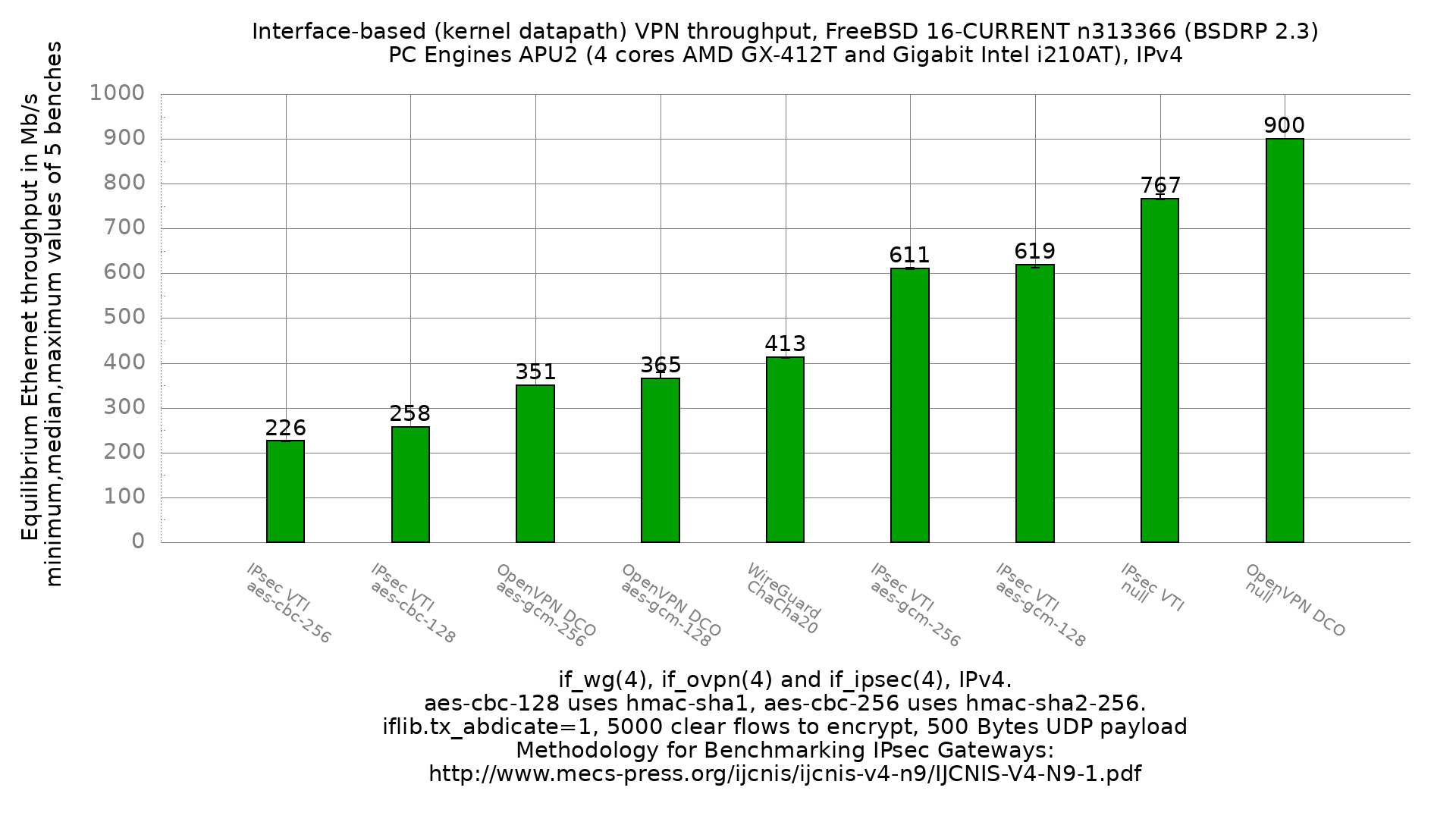
All three route into a kernel interface, so they are comparable on the same DUT, image and method. IPv4:
| VPN | cypher | Mb/s | kpps |
|---|---|---|---|
| OpenVPN DCO | null | 900 | 207.6 |
| IPsec VTI | null | 767 | 170.6 |
| IPsec VTI | aes-gcm-128 | 619 | 137.7 |
| IPsec VTI | aes-gcm-256 | 611 | 135.9 |
| WireGuard | chacha20-poly1305 | 413 | 95.2 |
| OpenVPN DCO | aes-gcm-128 | 365 | 84.2 |
| OpenVPN DCO | aes-gcm-256 | 351 | 81.0 |
| IPsec VTI | aes-cbc-128-hmac-sha1 | 258 | 57.4 |
| IPsec VTI | aes-cbc-256-hmac-sha256 | 226 | 50.3 |
Do not read this as a single ranking. Two things are mixed in it:
- The forwarding path. OpenVPN DCO has the fastest one of the three: 900 Mb/s on the null cypher against 767 for IPsec VTI.
- The crypto. OpenVPN DCO also has the slowest AES-GCM: 365 Mb/s against
619 for the same cypher under IPsec VTI, which drives it through
aesni(4).
The cypher cannot be held constant across the three, because WireGuard
implements only ChaCha20-Poly1305 and neither if_ovpn(4) nor
if_ipsec(4) offers it here. On a 1 GHz CPU with AES-NI but no ChaCha
acceleration, that is the dominant term: the AES-GCM rows use a
hardware-accelerated cypher and the WireGuard row does not. WireGuard sitting
between the two AES-GCM implementations says more about which cypher the
hardware accelerates than about the three stacks.
So: pick IPsec VTI with AES-GCM for raw throughput on this hardware, and read
the WireGuard figure as what an unaccelerated cypher costs rather than as a
verdict on if_wg(4).
Full result sets and configurations
Every graph above, with the per-iteration raw data, the min/max bars and the device configurations, is published in the netbenches repository:
- IPsec VTI (route-based), IPv4 and IPv6
- IPsec policy-based, IPv4 and IPv6
- OpenVPN userland versus DCO
- WireGuard, IPv4 and IPv6
The configuration sets uploaded to the device under test and to the IPsec peer
for each data point are alongside them:
ipsec, openvpn,
wireguard, and the lab topology is in each bench
directory's bench-lab-*.config.
For the lab wiring, the switch configuration and the generator setup, see Setting up a VPN (IPsec, GRE, etc...) performance benchmark lab and Setting up a forwarding performance benchmark lab.